Testing in Python
Table of contents
Introduction
This article assumes the reader already understands why testing is important and wants to write tests for a Python web application. It begins with an overview of the testing pyramid before introducing pytest, several useful pytest plugins, and Testcontainers, illustrating how these tools fit together to build an effective testing strategy.
The Testing Pyramid
There are three primary categories of tests: unit tests, integration tests, and end-to-end tests. Unit tests should be the most numerous, followed by fewer integration tests, then even fewer end-to-end tests, thus making a testing pyramid:
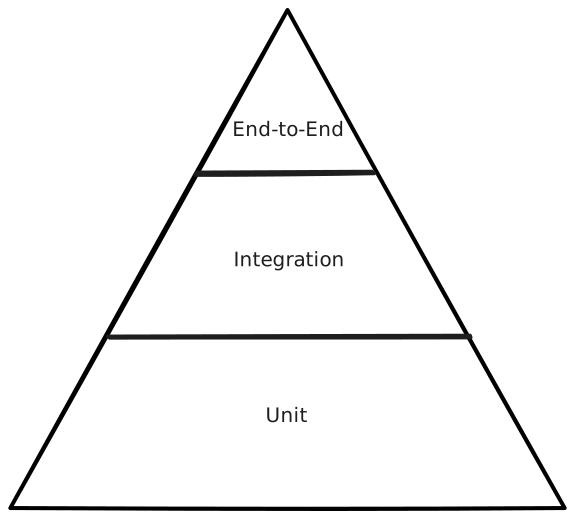
Unit tests verify individual pieces of functionality, without reliance on external systems. Once the unit tests are passing, it becomes much easier to diagnose failures in tests that rely on external systems. One way to eliminate reliance on external systems is through mocking, where dependencies are replaced with objects that expose the same interface.
Integration tests verify the behavior between two services. There should be fewer integration tests than unit tests because they build upon the correctness established by the unit tests.
End-to-end tests test the behavior of the whole system. End-to-end tests should be the least numerous because they interact with the entire system, making them slower and more susceptible to failures caused by infrastructure, networking, or timing rather than bugs in the application itself. It is critical that tests are not too flaky, or developers will be less likely to rely on the test suite.
Python Implementation Details
While the Python standard library includes the unittest module, most modern Python projects use pytest because it requires less boilerplate, has more expressive assertions, and provides a rich plugin ecosystem. Some pytest plugins of particular interest are pytest-mock, for mocking, and pytest-asyncio, for asynchronous tests. Another package that is valuable for the higher tiers of the testing pyramid is Testcontainers, which spins up Docker containers from within code.
The typical structure of a test follows the Arrange-Act-Assert pattern:
- Arrange data.
- Act by executing the behavior under test.
- Assert the expected outcome.
- Cleanup any leftover resources.
This structure keeps tests easy to read by clearly separating setup, execution, and verification.
Tests are executed by running pytest in the command line, which finds files of the form test_*.py, and runs all functions with the name test_* in those files. pytest supports additional discovery rules that are beyond the scope of this article.
A simple unit test in pytest is as follows:
def test_addition():
	a = 2
	b = 3
	assert a + b == 5
pytest uses standard Python assertions and rewrites them to produce detailed failure messages without requiring custom methods.
Moving beyond a single test, there is often some shared context, such as a database connection, used by multiple tests. In particular, one may want to define fixtures, which are reusable functions that provide context to tests. pytest automatically discovers a file named conftest.py and executes it, making fixtures contained within it available to tests in the same directory hierarchy.
To provide a mock of a database service to multiple tests, in conftest.py, write:
import pytest

@pytest.fixture(scope="function")
def mock_database(mocker):
    mocker.patch(
        "myapp.database",
        new=FakeDatabase(),
    )
The function is annotated as a fixture, and it is configured with function scope. Using scope="function" means that the fixture is created before and destroyed after each test function. pytest-mock is implicitly used by accepting as an argument the mocker fixture it provides. In the fixture, the behavior of database is replaced with a FakeDatabase mock, using mocker.patch, where FakeDatabase is a lightweight test implementation exposing the same interface as the real database.
pytest injects fixtures into tests simply by matching parameter names. Later to use the mock_database fixture, accept it as an argument:
import pytest
import myapp

@pytest.mark.asyncio
async def test_read_database(mock_database):
    db = myapp.database
    result = await db.read_document("123")
    assert result.id == "123"
Note that this test is annotated with @pytest.mark.asyncio, which indicates that it must be executed in an asyncio runtime. By default, pytest executes synchronous tests only. Plugins such as pytest-asyncio provide an asynchronous execution runtime.
Unit testing is useful, but eventually the application must be verified against real services. To that end, Testcontainers can be used to spin up infrastructure. Instead of mocking every dependency, Testcontainers allows tests to interact with real infrastructure, like databases or message queues, while still keeping each test isolated and reproducible. This makes it particularly well-suited for integration tests and end-to-end tests.
In conftest.py, write
import pytest
from testcontainers.core.container import DockerContainer

@pytest.fixture(scope="module", autouse=True)
def setup(request):
    postgres = (
        DockerContainer("postgres:latest")
        .with_exposed_ports(5432)
    )

    postgres.start()

    def remove_postgres():
        postgres.stop()

    request.addfinalizer(remove_postgres)
Using scope="module" starts the container only once for the module, allowing multiple tests to reuse the same infrastructure. Using request.addfinalizer() guarantees that, once the cleanup function has been registered, the containers will be stopped even if the remainder of the fixture setup fails. In contrast, teardown code in a yield fixture is not registered until execution reaches the yield statement.
To run a whole system, Testcontainers can use Docker Compose:
import pytest
from testcontainers.compose import DockerCompose

@pytest.fixture(scope="module", autouse=True)
def setup(request):
    compose = DockerCompose(
        "..",
        compose_file_name="docker-compose.yaml"
    )
    compose.start()

    def remove_compose():
        compose.stop()

    request.addfinalizer(remove_compose)
A single container fixture suits most integration tests, while Docker Compose is better reserved for end-to-end tests that need multiple interconnected services running together.
Conclusion
A good test suite is built from the bottom up. Unit tests provide fast feedback on individual components, integration tests verify interactions between services, and end-to-end tests validate the behavior of a complete system. pytest makes writing these tests straightforward, while Testcontainers enables integration and end-to-end testing against real infrastructure within the same framework. Together, these tools enable building reliable test suites that catch bugs earlier, and can easily integrate with CI/CD pipelines.